If you haven’t used Gmail Labs before, full tutorial here.
I spent a lot of time in my inbox so I am constantly looking for ways to make it more customized to my workflow. Although there is no silver bullet for inbox zero (except perhaps blinding deleting all emails each day), gmail labs and gmail plug-ins are a huge help.
Recycle old emails with Canned Responses
If you are constantly writing similar responses, why are you starting from scratch each time? Gmail Lab’s ‘Canned Response’ feature allows you to save the text you use most frequently in emails.
If you haven’t used Gmail Labs before, full tutorial here.
Types of canned responses I use at InclineHQ:
- How Incline works (explains what we do and why we do it)
- Confirming weekly speakers
- Accepting a new student to the next class
- On-boarding new hiring partners
- Weekly student feedback requests
Now instead of trying to think of all the scenarios upfront, save as you go. If you write an email this week you know you’ll use in the future, go to canned response and ‘save new’ before you send.
Next time you write that email you can drop in the text you need and edit before sending. That way if you have to change any details (name of person or change of dates) you can do it quickly. It’s much faster than searching your inbox for an old email to copy and paste language.
I haven’t checked it out yet but Text Expander comes recommended from Alex Godin. It costs $35 but gives the added benefit of being able to use it outside email.
Reduce the amount of email you see with filters
Email is a fast, efficient, and widely adopted communication tool when you’re able to utilize it only to do things that add value.
Last week I wrote about one of my favorite Gmail hacks by using Google appointment slots to streamline scheduling meetings. Another favorite is Gmail Filters. I use Twitter, Facebook, Instagram often enough that getting an email notification for everything is redundant. Instead I only opt-into the notifications that I care about and have them all filter into a ‘Social’ folder. For non-urgent email, I filter into a ‘Read Later’, for articles, or ‘Rodeo’, for long-term projects.
Thankfully, filter is now getting easier. This week Gmail announced teh launch of automatic filtering. Access will roll out to Gmail users in the coming weeks. (hint, hint: Google, I’d love to try it out.) Thanks Eric Radstake for the video below!
If you still have email that you delete every day or week - pledge to yourself that you’ll stop torturing your inbox and just unsubscribe. The company sending it can save the pennies it saves on sending it to you and may see an open-rate bump with a lower denominator.
Reuse more emails by setting up introduction context
Need an introduction or connection? Speed up the email-introduction process by providing what you need, why and how to get in touch.
Poor request:
Can you make that intro?
Name
Reusable request:
As we discussed on the phone, I’m interested in talking to companies that are looking for an iOS developer. I have 3 years of experience working at Company Y.
Here are the links for my portfolio, github and LinkedIn profile. I’ve applied to the company directly through their website but have attached my resume here.
Thanks,
Name, Email, Social Links
By setting up the context for the request, it’s easy to quickly forward the email instead of starting from scratch. Reusing email is a two-way street so trying to be mindful of setting it up on your end is essential. Canned responses can help here too!
What tools do you use to manage email?
Let me know on Twitter @br_ttany.
This is the second post on gmail productivity hacks. Read the first ToolsThursday post: Hack your google calendar.
Ever notice how much time you can spend emailing back and forth when trying to setup a meeting? Swapping available times and confirming meeting logistics take you away from doing things that actually add value.
With Google Appointment slots you can share one link and be done. If you have a paid Google Apps account you can set it up in minutes. And if you’re not on a paid account this feature might be worth the $50/year.
Creating Appointment Slots
Now to create your first appointment slots. First, open up your Google calendar and drag to create a new time slot. The default type will be Event. Click “Appointment slots” on the top left corner by clicking the blue link that will change the edit options.

From this view you now have the option to pick how long you want the appointment slots to be. I typically setup one chunk of time for phone meetings for 30 minutes each.
To have further editing options, click ‘Edit details’ from this view [screenshot below]. Now you have the ability to create the appointment slots on a weekly basis (blue arrow). I try to take most meetings on Tuesday, Wednesday and Thursday so I have them repeat weekly. And you can set default location or phone number for the meeting (red arrow).
Once you have your appointment slots setup, you can copy and paste the calendar link to share when setting up your next meeting (purple arrow). This link will show all of your available appointment slots. I set up separate blocks for phone calls, breakfast meetings, lunch meetings and in-office meetings. This link will show you all of those even though they were edited separately.

When you click on the calendar link you see the appointment slots compared against your calendar since you are likely logged into your own account. Your meeting partner would see their own calendar with your appointment slots overlaid so they could choose a time without an existing conflict. Once they click an appointment slot to edit any additional details and you receive an email confirmation.

You’ve now just turned three back-and-forth emails into one reply and one confirmation email.
Putting appointment slots into your work flow
The calendar link is pretty ugly and a few clicks away to access on a regular basis so I use Google’s canned responses option to shortcut the link into my email flow.

In addition to adding my Google calendar appointment slot link as a pretty URL, I also added some language around it that I found myself always including. As developers know, take the DRY approach (don’t repeat yourself).

Now you’re good to go!
Beyond just saving my inbox, I’ve found that creating appointment slots helps me stay disciplined about blocking off solid chunks of time to do work. Instead of jumping in and out of tasks, I have set time periods of work and set time to speak with others. Productivity hacking at it’s best.
FAQs
What about Tungle.me?
Tungle.me has a similar use case but I found it to require too much work for the other person to book an appointment. I wanted something that was saving us both time, not offloading my work elsewhere.
What if the other person doesn’t have Google calendar?
How sad! You’ll have to default back to the old way of doing things.
What if the person is in another time zone?
Sometimes Google calendar can be a little wonky on time zones if your or your meeting guest don’t have it setup properly. You will get a confirmation email when the appointment is setup so it’s worth doing a double check that the hours make sense. Ex: 3AM call anyone?
What tools do you use to get back to adding value?
Let me know on Twitter @br_ttany.
Everyone, I’m elated to tell you that Tumblr will be joining Yahoo.
Before touching on how awesome this is, let me try to allay any concerns: We’re not turning purple. Our headquarters isn’t moving. Our team isn’t changing. Our roadmap isn’t changing. And our mission – to empower creators to make their best work and get it in front of the audience they deserve – certainly isn’t changing.
So what’s new? Simply, Tumblr gets better faster. The work ahead of us remains the same – and we still have a long way to go! – but with more resources to draw from.
Yahoo is the original Internet company, and Marissa and her team share our dream to make the Internet the ultimate creative canvas. I couldn’t be more excited to have her help. We also share a vision for Tumblr’s business that doesn’t compromise the community and product we love. Plus both our logos end with punctuation!
As always, everything that Tumblr is, we owe to this unbelievable community. We won’t let you down.
Fuck yeah,
David
Congrats Tumblr team!
I love this chain of anecdotes. They make my brain tingle. This is the story I didn’t get around to telling when I wrote about the Stewart Brand profile.
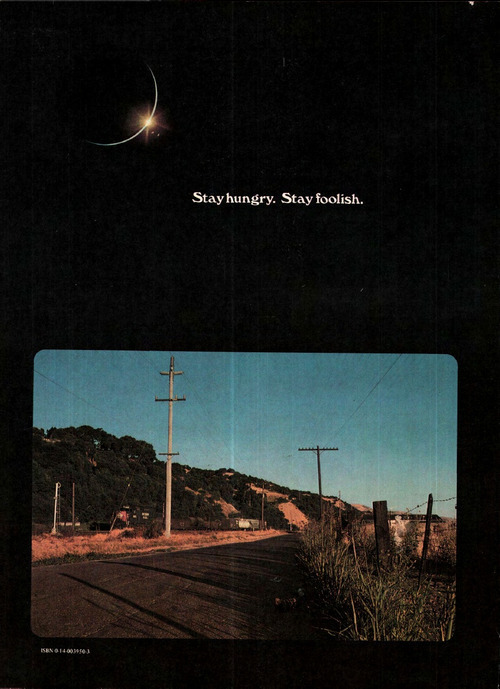
It starts with Steve Jobs’s Stanford commencement address where he talks admiringly of Stewart Brand and quotes that slogan that has since come to be associated with Jobs:
“Stewart and his team put out several issues of the Whole Earth Catalog, and then when it had run its course, they put out a final issue. It was the mid-1970s, and I was your age. On the back cover of their final issue was a photograph of an early morning country road, the kind you might find yourself hitchhiking on if you were so adventurous. Beneath it were the words: ‘Stay Hungry. Stay Foolish.’ It was their farewell message as they signed off. Stay Hungry. Stay Foolish. And I have always wished that for myself. And now, as you graduate to begin anew, I wish that for you.”
When asked if he was surprised that Jobs loved that phrase, Stewart Brand says:
“I was, yes, though I’d known it meant something to him as I’d been told that he wanted a copy of the cover of ‘Stay Hungry, Stay Foolish’ signed by me. And I signed one and sent it off to him. That was the first inkling I had that it mattered to him.”
Imagine that. Steve Jobs asking for your autograph. A hero’s hero indeed.
It gets even better.
What does that quote mean, really? Stewart Brand describes the inspiration for that quote and the design of that last page:
“Oh I know, it’s because of my campaign to get photographs of the whole Earth which I did in 1966 and after which the Whole Earth Catalog is named.”
1966. Brand started a campaign to get NASA to release photographs of the earth. He created buttons that said, “Why haven’t we seen an image of the whole earth yet?” Imagine that. 1966. A time of first trips to space. A world that had never seen a photograph of the entire planet.
But back to the story about the quote. Brand goes on:
“We were just starting to get files of photographs of the Earth, and there was a sequence from a satellite of basically a day in the life of Earth from sunrise to sunset, and I wanted that sequence and to make the connection between the view from space of the shadow moving across the Earth, and the experience of being on Earth and seeing dawn. And for some reason the image I had in my mind was of a hitchhiker at dawn on a road somewhere and the sun comes up and there are trains going by. The frame of mind of the young hitchhiker is one of the freest frames of mind there is. You’re always a little bit hungry and you know you are being completely foolish.”
If you are like me, you think, I wish I had a copy of that. I wish I knew what that looked like.
Because the internet is a wonderful place, you can actually look up what that page looks like.
It’s kind of an odd mash up. If you looked at it without context, it doesn’t really make sense. But when you know the story and you connect the dots, then you see it, you understand why it inspired a visionary.
Stay hungry. Stay foolish.
Hoping someone revives all of the whole earth catalogs for iPad.
“One of the best things you can do for yourself is become acutely aware of your energy and how you manage and care for it.” — Indigo Williams (via soul-confit)
(Source: thestufflifeismadeof, via thatkindofwoman)
InclineHQ: Welcome Liz Taub to Incline -
Hi, I’m Liz Taub. I’m the new Executive Director at Incline. Incline is a social enterprise working to educate, support, and equip military veterans with the skills and resources needed to pursue full-time job opportunities in technology and engineering. There are thousands of open…
Awesome win for Incline. Read more about our new Executive Director, Liz Taub!
[video]
[video]

Wi-Fi and other open wireless technologies are like a sky full of legos, that anyone can use to build awesome stuff.
TODAY: support the FCC in keeping more of our airwaves (aka spectrum) open for innovation.
Sign the letter at http://weheartwifi.com
Comments close at 5pm today, Tuesday 3/12. So pls sign and pass along!
If you believe in national open wifi, take 2 seconds to sign the petition. Thanks!

The problem with content apps.
(via xkcd: App)